


MagicJack
Categories: Featured Products, Household Products
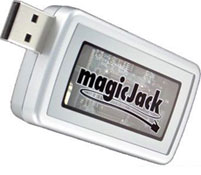 MagicJack is the amazing device that lets you make unlimited calls to anywhere in the USA and Canada for 1 low annual fee.
It is simple and easy use. MagicJack works with your existing computer and internet connection to give you unlimited phone calls.
You simply plug the MagicJack into the USB port on your computer and then plug in any household phone to the MagicJack. You can use your existing home phone.
MagicJack has received rave reviews in the media and has been named the 2008 Product of the Year for good reason.
Just like the Internet has eliminated the need for stamps and postal mail, with MagicJack it has eliminated the need for traditional phone lines.
MagicJack works with computers running Windows XP, Widows Vista, and Macs.
In addition to free local and long distance, you’ll also get free directory assistance, a free phone number, free call waiting, free voice mail, and free caller ID.
Get the Flash Player to see this player.
MagicJack retails for just $39.95 plus shipping and handling, which includes 1 year free of unlimited local and long distance calling. Each additional year is just $19.95.
Since the company is so sure that you’ll like a MagicJack, right now their willing to offer a 30-day 100% risk free trial.
 Jupiter Jack
 Porta Book
 Zomm
Zomm Finally Fast
 The Notebook Buffer
Stanley Lechwar on Sun, 7th Jun 2009 6:55 am
After you plug in a phone, does Magic Jack work on all the phones in one’s house? Or does it only work on one phone?
As Seen On TV on Sun, 7th Jun 2009 11:03 am
Stanley,
It depends on what type of phones you have. If you have one of those multi-handset phone system which only requires the base to be plugged in to the phone line then you can use all the handsets in your house.
Here’s an example: Uniden TRU9485-3 5.8 GHz Digital Cordless Answering System with Dual Keypad and 2 Extra Handsets
Dr Rocco Badenhorst on Sun, 28th Jun 2009 6:10 am
I saw that you offered this service on TV with free activation and free shipping. I also need to verify that I will be able to keep my phone number in Bloomington. If you can satisfy these concerns we can proceed towards signing up.
RTB
george matthew on Thu, 9th Jul 2009 6:17 am
Dear,
Could you please let me know if the incoming calls can be directed to a third country on a different number.
Example: I am a resident of Ireland and purchased a magic jack in NZ to make calls to the US and Canada. Now, when any xyz person calls me on my NZ number then is it possible to receive the call on my personal cell in Ireland.
If Magic Jack can cater to such requirement, then the product is useful for me.
Please provide the detailed information at the earliest.
Thanks
Robert Porter on Sun, 20th Sep 2009 9:29 pm
Can I fax with Magic Jack?
As Seen On TV on Sun, 20th Sep 2009 9:47 pm
Robert,
MagicJack does not officially support faxing but many people are able to fax over it without any problems.
For maximum compatibility with your fax machine you should turn off error correction features and set the fax machine to use the slowest speed available.
Bob on Wed, 21st Oct 2009 5:41 pm
Saw one question about adding you home phone system to majic jack. Heres what I did. 1. disconnected incomming phone line to house. 2. Plugged Majic Jack into an A/C powered USB Hub. 3. Plugged my Majic Jack directly into the house phone line by using a phone cable attached to my majic jack and plugging it into one of the existing phone plug jacks for the house. I operate 2 base units with 3 cordless phones each and I use one house phone hanging in the kitchen plugged into a regular house phone jack. All my home phone jacks work great.
Rosie on Wed, 6th Jan 2010 12:54 am
Of what significance are the different colors that come up on the received numbers list on theright side of majic jack screen?
Sean on Thu, 17th Jun 2010 1:25 pm
I don’t care what everybody says. the magic Jack is a great product. There are a lot of people who complain about it but usually those are people who can’t figure out how to make it work on their computer because of some issue on their end.
And about call quality. Do you really expect it to be 100% perfect for $1.60 per month?
I’m tired of people saying their service is bad and cheap… duh, it is cheap. That’s why they can pass this savings onto you and only charge you $19.95 per year. You didn’t actually expect perfect service at such a low cost did you?
Maie on Sat, 19th Jun 2010 10:50 am
Interested in using it in Europe
Erica on Mon, 26th Jul 2010 1:54 pm
Can you use Magicjack if you use WiFi for your internet connection? Do you have to already have a land based phone line installed in your house? Thank you.
As Seen On TV on Mon, 26th Jul 2010 4:29 pm
Erica,
It will work with a WiFi connection. You do not need to have a land line already for the MagicJack to work.
Erica on Mon, 26th Jul 2010 5:47 pm
Thank you very much for your help. Is the promotional price for online only, or can it also be where ever it is that you purchase the product?
As Seen On TV on Sun, 1st Aug 2010 7:06 pm
Erica,
The price should be around $40 in the MagicJack in stores too. However they usually don’t offer the 30 day trial period of the online offer.
Justin on Thu, 9th Sep 2010 11:23 am
The Mgic Jack isn’t perfect but for around $30 a year it is much cheaper than other voip services.
Anoosh on Wed, 6th Oct 2010 5:24 pm
Hi.. I live in Ireland.. Can I get the magic jack shipped to Ireland? If I want to purchase it?
Kamran on Mon, 15th Nov 2010 3:09 pm
Can I make free calls from USA to Pakistan on majicjack ?
JoAnne Martinson on Tue, 4th Jan 2011 8:38 am
In my area (DC metro area) the service is being sold, but if you want to keep your old phone number, you’re out of luck. They don’t say this in the ads, but they don’t even have an electronic way of “porting” or bringing to their system, any existing phone number. They can’t even say when they will be able to do this. Let the buyer beware.
Shana on Tue, 13th Dec 2011 7:45 am
How do you get incoming calls with Magic Jack? Do you get a phone number along with the service?
raymond gonzalez on Mon, 9th Jan 2012 5:09 pm
I’am in puerto rico,will the magicjack work ?